Notice
This guide is for the original release of AQtive Guard. For the current AQG SaaS platform, go to the AQtive Guard User Guide.
Handshake fundamentals↑
The SandboxAQ Network Analyzer can identify TLS and SSH handshakes and extract cryptographic data. The Handshakes and Ciphersuites tabs provide details about the negotiation of cryptographic parameters during data transmission.
Note
The Handshake and Ciphersuite tabs are only available in Network Analyzer reports.
Viewing Ciphersuite and Handshake data↑
To view Ciphersuite and Handshake data:
- Log in to the AQtive Guard Web Interface, then select Projects from the menu bar.
- Locate a project with an analysis created using the Network Analyzer. You may need to:
- Use the filters at the top of the table to narrow your view.
- Request access to a specific project if it’s not initially visible.
- Select a project row, then navigate to the Reports tab.
- Select a report row, then select the Ciphersuites and Handshakes tabs to view the relevant information.
Handshakes table↑
In a Network Analyzer report, the Handshakes table presents an overview of the handshakes detected in the uploaded PCAP file. You can filter this table by any column to focus your analysis on specific handshake attributes.
You can also filter by protocol:
- TLS - Encrypts data in transit, such as during web browsing, email, and online transactions. It authenticates the server, maintains client anonymity, and verifies website owner identity. For authentication, TLS typically relies on ciphersuites and digital certificates issued by a trusted third-party certificate authority (3P CA).
- SSH - Encrypts connections between computers, allowing technicians to securely access servers and devices remotely to execute commands. SSH assumes users can decide who to trust without a 3P CA, usually using public key authentication. SSH supports multiple authentication methods, including passwords, SSH keys, and SSH certificates.
TLS handshake details↑
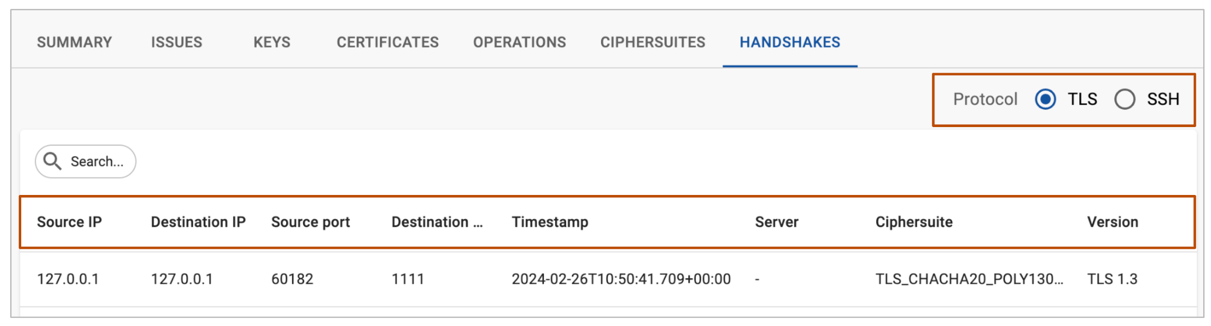
A network analysis provides handshake details such as:
- Source IP / Destination IP - IP addresses of the devices initiating and receiving the connection.
- Source Port / Destination Port - Port numbers used for communication by the source and destination devices.
- Timestamp - Times when the client and server sent or received handshake messages.
- Server - Public name of the server involved in the handshake process.
- Ciphersuite - Encryption algorithms and methods used for TLS protocol.
- Version - The protocol version used.
Not all information is displayed in every view. Refer to the Network Analyzer reference for details.
SSH handshake details↑
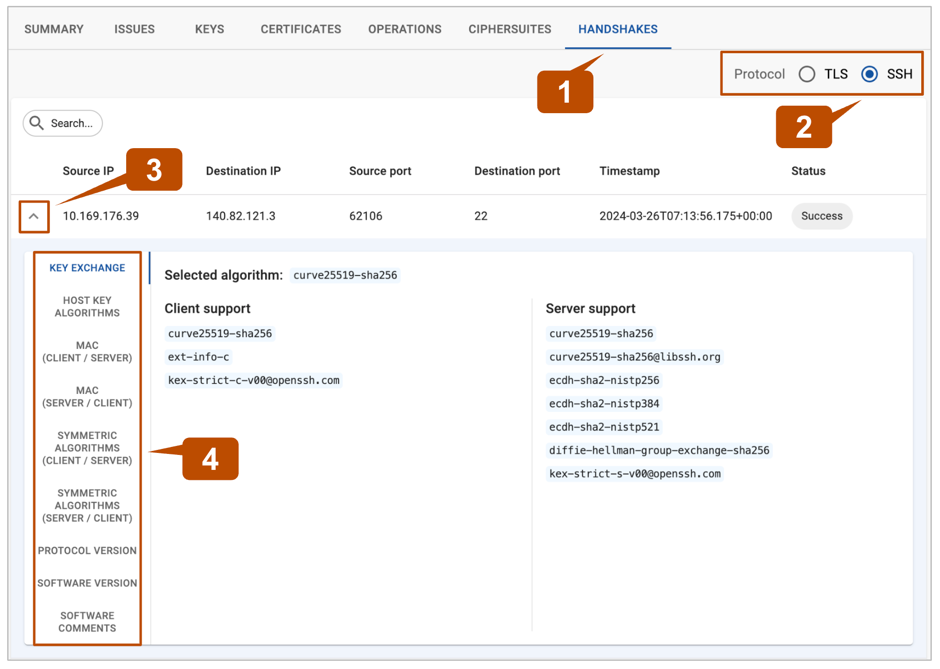
Instead of using a ciphersuite, SSH typically negotiates individual algorithms for key exchange, encryption, and message authentication code (MAC). To view SSH handshake details:
-
In a network analysis, select the Handshakes tab.
-
Select the SSH protocol filter.
-
Locate a handshake you want to explore, then select the dropdown at the left side of the row.
You may need to use the Search filters to narrow your view.
-
Select the menu items on the left of the screen to reveal SSH handshake details:
- Key exchange - methods used to exchange cryptographic keys between the client and server.
- Host key algorithms - algorithms used to authenticate the server.
- MAC (client / server) - algorithms used by the client to ensure data integrity and authenticity.
- MAC (server / client) - algorithms used by the server to ensure data integrity and authenticity.
- Symmetric algorithms (client / server) - encryption methods used by the client to ensure data confidentiality.
- Symmetric algorithms (server / client) - encryption methods used by the server to secure communication.
- Protocol version - SSH protocol version used for the connection.
- Software version - SSH software version being utilized.
- Software comments - additional information or comments, if available.
Ciphersuites table↑
In a Network Analyzer report, the Ciphersuites table displays the ciphersuites selected and negotiated during TLS handshakes.
You can filter the Ciphersuites table by two categories:
- Only selected in the negotiation: This filter displays ciphersuites that were actively chosen and used during data transmission.
- Only recommended by IETF: You can filter ciphersuites based on recommendations from the Internet Engineering Task Force (IETF), ensuring compliance with industry standards.
Tip
Select any ciphersuite to open a Handshakes table that’s automatically filtered to show associated TLS handshakes.
Ciphersuite details↑

- Protocol - communication protocol used for securing the data exchange.
- Version - protocol version used for the connection.
- KEX - Key EXchange methods used to exchange cryptographic keys between the client and server.
- Auth - authentication mechanism used to verify the identities of the communicating parties.
- Symmetric Encryption - algorithm used for encrypting data with a shared secret key.
- MAC - algorithm used to ensure data integrity and authenticity.
- Mode of operation - method applied to use the symmetric encryption algorithm for securing data.
- Hash - hash function used for generating fixed-size hashes from input data.
- IETF Recommendation - Indicates whether the ciphersuite adheres to recommendations by the Internet Engineering Task Force.